Now on the App Store

Apps that work smarter for you

Ilkov Group builds focused, privacy-first mobile apps that solve real problems, no bloat, no gimmicks.

Download on the App Store Try red flags in your browser
Scroll
ScanLyte
AI document scanner for iOS
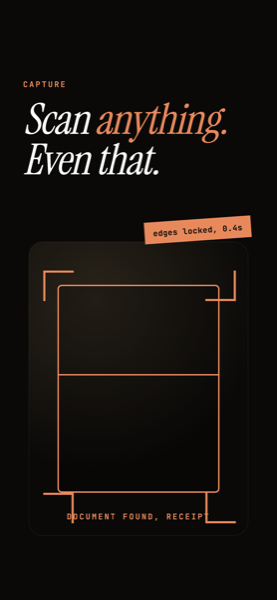
Capture

Scan anything.
Even that.

Edge-locked scans in under a second. Receipts, IDs, contracts, the crumpled stuff at the bottom of your bag.

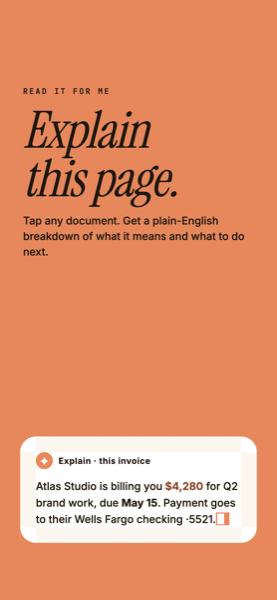
Read it for me

Explain
this page.

Tap any document for a plain-English breakdown of what it means, and exactly what to do next.

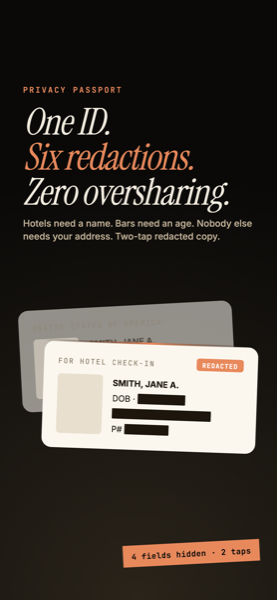
Privacy Passport

One ID.
Six redactions.

Hotels need a name. Bars need an age. Share only what's needed with a redacted copy in two taps.

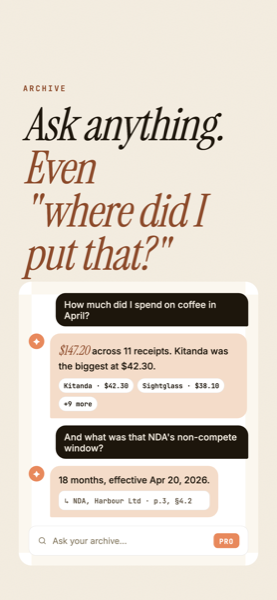
Ask your archive

Ask anything.
Even "where did I put that?"

Chat with every scan in plain language, answered from your own documents, with the receipts to back it up.
Scan anything, even tricky documents Plain-English explanations of any scan Privacy Passport encrypted ID vault Ask your archive in natural language
New in 1.0.8

Three things your scanner never did before.

Bill radar · Starter

Never miss a due date.

Scan a bill and ScanLyte spots the due date and amount. One tap sets a reminder that arrives before it's late, even while you're in the app.

How Bill radar works
Contract red flags · Pro

Know what to ask before you sign.

Marks the clauses worth pushing back on, right on the page, each with the question to ask. Not legal advice, just a sharper read.

How red flags works
Hide areas, now with Erase · Pro

Hide it. Or erase it.

Black out a name, or erase it so the page closes up as if it was never there. The copy is what you share; the original stays untouched.

How hiding and erasing works
Try it here

Tap a highlighted clause.

A sample lease with the three clauses ScanLyte flagged and the question it gives you for each. This page is a static preview; in the app, Red flags reads any contract you scan.

RESIDENTIAL LEASE AGREEMENT

This Agreement is entered into between Brightside Properties LLC ("Landlord") and the undersigned ("Tenant") for the premises at 123 Mission St, Apt 4B.

TERM: The term of this lease shall be twelve (12) months, commencing June 1 and ending May 31.

RENT: Tenant agrees to pay $3,400.00 per month, payable on the first day of each month. Late fees apply after the 5th.

SECURITY DEPOSIT: $3,400.00 due upon signing.

TERMINATION: Either party may terminate with sixty (60) days written notice. Early termination by Tenant forfeits the security deposit unless mutually agreed otherwise.

GOVERNING LAW: This agreement is governed by California law.

Red flags · 3 found

Late fee, no amount or cap

"Late fees apply after the 5th."

The lease says a late fee exists but not how much it is, whether it grows, or whether it's capped. That's where surprise charges live.

Ask: How much is the late fee, and is it capped?

Not legal advice. Points worth asking about, based on the document text.

Erase a row. Watch the page close up.

Drag across the bill. A black box says "something was here". Erase removes the row and the rest of the page moves up, so the copy you send reads as if the line never existed.

INVOICE #INV-2026-058
Business Internet 1Gbps$109.99
Consulting · after-hours · 3h$450.00
Static IP add-on$15.00
Equipment lease$9.95
Taxes & fees$8.43
TOTAL DUE$593.37
INVOICE #INV-2026-058
Business Internet 1Gbps$109.99
Static IP add-on$15.00
Equipment lease$9.95
Taxes & fees$8.43
TOTAL DUE$593.37
Original Erased copy
Pricing

Start free. Upgrade when it pays off.

Capture, sign, hide or erase, catch due dates, flag risky clauses, and chat with your documents. Built private by default, with on-device storage and an encrypted proxy for AI that doesn't log or train.

Download on the App Store
3 scans per month
Multi-page scanning
Basic OCR
Instant Explanations · 2/mo
1 folder
3 scans per week
Unlimited folders
All filters
PDF signing
Shrink & share for email
Instant Explanations · 5/wk
Bill radar · due-date reminders
30 scans per week
Everything in Starter
Instant Summaries · 10/day
Instant Explanations · 25/wk
Ask your archive · ~25 chats/wk
Smart Enhance · 10/wk
Auto-Sort by Category
Multi-page reorder
Expense tracking · date-range export
Privacy Passport · encrypted IDs
Contract red flags · 10/wk
Unlimited scans per week
Everything in Pro
Unlimited AI
Custom watermark
Table → CSV export
Per-client expense reports
TodayFull access. No payment due.
Day 5A reminder before the trial ends.
Day 7Billed yearly. Cancel anytime before.

Yearly plans save 33% and start with a 7-day free trial

0
Documents stored on our servers
0
Trackers or ad pixels
0
AI training on your scans

"I have been looking for an app to scan my documents that is as good as Scanlyte for years and I have finally found it!! … Easy to use and without restrictions!!"

juanchoofree · App Store · Aug 28, 2026

"Hands down the best app for scanning docs on the go. Great features and easy to use. Definitely worth every penny. Highly recommended!"

Alex Buyukliev · App Store · Aug 28, 2026

"…it has assisted me so much in everything I’ve been doing for work … this app is basically a cheat code to do whatever you need to in like 1/2-1/4 of the time."

Joseph28163 · App Store · Apr 30, 2026
Privacy, feature by feature

What leaves your phone.

FeatureWhere it runsWhat is sent
Scanning, OCR, filing, searchOn deviceNothing.
Bill radarOn deviceNothing. The due date and amount are read from the text on your phone; the reminder is a local notification.
Hide areas, Erase, Privacy PassportOn deviceNothing. Redacted copies are rendered on your phone.
Explain, Summaries, Red flagsEncrypted proxyThe text of the one document you tapped, through our zero-retention proxy to OpenAI, then discarded.
Ask your archiveEncrypted proxyYour question plus the few passages that match it, found on your phone first. Never the whole archive.
AnalyticsOur serverAnonymous counters such as "upgrade screen shown". No device ID, no user ID, no content. Full policy.

FAQs

How does ScanLyte stay private when I use Ask Your Archive?

Documents live on your iPhone. When you ask a question, ScanLyte's on-device search finds only the chunks relevant to your question, then sends those (plus your question) through an encrypted proxy to OpenAI for the answer. OpenAI doesn't train on your data and the proxy doesn't log content. Your full archive never leaves the device.

What about Explain This, AI Summary, and Contract red flags?

Same path: just the document you tapped on, sent through the encrypted zero-retention proxy. OpenAI receives the text, returns the answer, and doesn't keep it. Red flags highlights the clauses on your phone from that answer; nothing else is uploaded.

Do you collect any analytics?

Only anonymous counters: that the upgrade screen was shown, that a purchase completed, that a reminder was set. No device ID, no user ID, no document content, and nothing is shared or used for advertising. The full list is in the privacy policy.

Can I use ScanLyte fully offline?

Yes. Everything except the AI features runs on your phone: scanning, OCR, organization, Bill radar, hiding and erasing areas, Privacy Passport, and PDF export. Only Explain, Summaries, Red flags, and Ask your archive need a connection.

Built with intention

Ilkov Group is a small software studio based in Georgia, USA, focused on building tools that respect your time and privacy. We don't chase trends, we solve problems that matter, one thoughtful app at a time.

Privacy First

Documents live on your device. AI features go through an encrypted, no-log proxy and OpenAI doesn't train on your data. We don't collect, sell, or share personal information.

No Bloat

Every feature earns its place. We build what you need, not what inflates our metrics.

Quality Over Quantity

We'd rather ship one great app than ten mediocre ones.

Get the app

One scan away.

Free to start on iPhone. Documents stay on your device.